MATLAB 2013.b supports direct integration.
It supports both definite and indefinite integrals.
However, if complicated functions are given you will see a message in the command window stating that the explicit integral could not be found. For definite integrals, the approximate result can be obtained by using 'double' function for the result of integration. If the integration results in a singular result, this won't work.
Format:
syms x;
y=int(sin(x),x);
The first line is for declaring 'x' as a symbolic variable.
This will result in
y=-cos(x)
If you are using definite integral,if you enter double(y), it will return the approximate value of the integration.
Try some examples on your own.

Tuesday, January 28, 2014


Sunday, December 23, 2012
MATLAB code for n-channel enhancement MOSFET with early effect
Enhancement mode MOSFET is influenced by early effect that
arises in short channel devices. Since we are dealing with 180nm technology the
devices are prone to short channel effects. This channel length modulation
introduces an additional term in the MOSFET equation. It’s represented as ‘λ’
but is different from the device parameter used for expressing sizes of
transistor parts. It’s the inverse of early voltage. The implication can be
understood by observing the output characteristics. The curve influence by
channel length modulation will develop a slope corresponding to the early
voltage in the saturation region of the output characteristic of the NMOSFET. This
video gives a better explanation to the working of MOSFET and guides you
through the implementation of code and interpretation of graphs.
MATLAB CODE
%n-channel enhancement mode
MOSFET output characteristics
clear all;
%kn=un*cox = 100
microA/Volts
kn=1e-4;
%Let W/L= 2
W=360*(10^(-9));
L=180*(10^(-9));
beta=kn*W/L;
%Vth is the threshold
voltage
Vth=1;
%lambda is the inverse of
early voltage in voltage inverse
lambda=1/1000;
%Sweep drain to source
voltge from 0 to 10V
vds=0:0.5:10;
%Ask the user to enter gate
to source voltage
vgs=input('ENTER THE Vgs
in volts');
%Estimate length of the
array
m=length(vds);
for i=1:m
if vgs < Vth
current(1,i)=0;
current1(1,i)=0;
elseif vds(i) >=
(vgs - Vth)
current(1,i)=0.5* beta * ((vgs -
Vth)^2)*(1+lambda*vds(i));
current1(1,i)=0.5* beta * ((vgs -
Vth)^2);
elseif vds(i) <
(vgs - Vth)
current(1,i)=
beta*((vgs-Vth)*vds(i) - 0.5*(vds(i)^2))*(1+lambda*vds(i));
current1(1,i)=beta*((vgs-Vth)*vds(i)
- 0.5*(vds(i)^2));
end
end
plot(vds,current(1,:),'b',vds,current1(1,:),'r')
xlabel('Vds, V')
ylabel('Drain
Current,A')
title('I-V
Characteristics of a MOSFET')
OUTPUT CHARACTERISTICS
In this graph, the early voltage is 200V. So the effect is higher than the case following this. The output characteristics have been highly modified with the help og graph editor in MATLAB to help viewers explore them.


Saturday, December 22, 2012
MATLAB code for n-channel MOSFET output characteristics
MOSFET is the most widely used semiconductor device in the present era. It's important to understand the working of MOSFET and graphical explanation helps in obtaining a fairly good idea on MOSFETs. Here is the MATLAB code for plotting the output characteristics of an n-channel MOSFET. The graph is also given below.
Use this video for VIDEO and AUDIO guidance and better explanation.


180 nm technology is assumed since it is the latest in use.
Early effect is not considered.
Early effect is not considered.
MATLAB code
%n-channel enhancement mode MOSFET output characteristics
clear all;
%kn=un*cox = 100 microA/Volts
kn=1e-4;
%Let W/L= 2
W=360*(10^(-9));
L=180*(10^(-9));
beta=kn*W/L;
%Vth is the threshold voltage
Vth=1;
%Sweep drain to source voltge from 0 to 10V
vds=0:0.5:10;
%Ask the user to enter gate to source voltage
vgs=input('ENTER THE Vgs in volts');
%Estimate length of the array
m=length(vds);
for i=1:m
if vgs < Vth
current(1,i)=0;
elseif vds(i) >= (vgs - Vth)
current(1,i)=0.5* beta * (vgs - Vth)^2;
elseif vds(i) < (vgs - Vth)
current(1,i)= beta*((vgs-Vth)*vds(i) - 0.5*(vds(i)^2));
end
end
plot(vds,current(1,:),'b')
xlabel('Vds, V')
ylabel('Drain Current,A')
title('I-V Characteristics of a MOSFET')


OUTPUT CHARACTERISTICS
Vgs=4V
Friday, August 5, 2011
Saturday, May 7, 2011
EFFECT OF RECTANGULAR | HAMMING | HANNING | BLACK MAN WINDOWS ON FIR lowpass filter
clear all;
close all;
f=input('enter the freq');
N=input('enter the number of samples');
w=2*pi*f;
alpha=(N-1)/2;
h=zeros(1,N);
for n=0:1:N-1
if n~=(N-1)/2
h(n+1)=sin(w*(n-alpha))/((n-alpha)*pi);
h(n+1)=1-h(n+1);
end
end
h(((N-1)/2)+1)=w/pi;
rectangular_window=boxcar(N);
ham=hamming(N);
han=hanning(N);
black=blackman(N);
h1=h.*rectangular_window';
h2=h.*ham';
h3=h.*han';
h4=h.*black';
w=0:.01:pi;
H1=freqz(h1,1,w);
H2=freqz(h2,1,w);
H3=freqz(h3,1,w);
H4=freqz(h4,1,w);
plot(w/pi,abs(H1),'r',w/pi,abs(H2),'g',w/pi,abs(H3),'y',w/pi,abs(H4));
OUTPUT
enter the freq 0.3*pi
enter the samples 33
PLOT
close all;
f=input('enter the freq');
N=input('enter the number of samples');
w=2*pi*f;
alpha=(N-1)/2;
h=zeros(1,N);
for n=0:1:N-1
if n~=(N-1)/2
h(n+1)=sin(w*(n-alpha))/((n-alpha)*pi);
h(n+1)=1-h(n+1);
end
end
h(((N-1)/2)+1)=w/pi;
rectangular_window=boxcar(N);
ham=hamming(N);
han=hanning(N);
black=blackman(N);
h1=h.*rectangular_window';
h2=h.*ham';
h3=h.*han';
h4=h.*black';
w=0:.01:pi;
H1=freqz(h1,1,w);
H2=freqz(h2,1,w);
H3=freqz(h3,1,w);
H4=freqz(h4,1,w);
plot(w/pi,abs(H1),'r',w/pi,abs(H2),'g',w/pi,abs(H3),'y',w/pi,abs(H4));
OUTPUT
enter the freq 0.3*pi
enter the samples 33
PLOT
 |
| EFFECT OF WINDOWS ON FIR lowpass filter |
Wednesday, April 27, 2011
DESIGN FIR LOWPASS FILTER WITH CUTOFF FREQUENCY 0.5*pi using HAMMING WINDOW
clear all;
wcutoff=input('ENTER THE CUT OFF FREQUENCY in radians eg: 0.5*pi--->');
N=input('ENTER THE NUMBEROF SAMPLES eg: N=25--->');
alpha=(N-1)/2;
epso=.001; %to prevent singularity when n=alphan=0:1:N-1;
hd=sin(wcutoff*(n-alpha+epso))./(pi*(n-alpha+epso));
%expression for FIR Lowpass filter
wr=hamming(N); %expression for Hamming window
hn=hd.*wr'; %wr'=transpose of wrw=0:0.01:pi;
h=freqz(hn,1,w); %MATLAB function for frequency response
xlabel('Normalised frequency \omega/\pi');
ylabel('Magnitude');
plot(w/pi,abs(h)); %to plot the graph
CLICK HERE FOR FIR LPF using RECTANGULAR WINDOW
OUTPUT
ENTER THE CUT OFF FREQUENCY in radians eg: 0.5*pi--->0.5*pi
ENTER THE NUMBEROF SAMPLES eg: N=25--->31
PLOT
wcutoff=input('ENTER THE CUT OFF FREQUENCY in radians eg: 0.5*pi--->');
N=input('ENTER THE NUMBEROF SAMPLES eg: N=25--->');
alpha=(N-1)/2;
epso=.001; %to prevent singularity when n=alphan=0:1:N-1;
hd=sin(wcutoff*(n-alpha+epso))./(pi*(n-alpha+epso));
%expression for FIR Lowpass filter
wr=hamming(N); %expression for Hamming window
hn=hd.*wr'; %wr'=transpose of wrw=0:0.01:pi;
h=freqz(hn,1,w); %MATLAB function for frequency response
xlabel('Normalised frequency \omega/\pi');
ylabel('Magnitude');
plot(w/pi,abs(h)); %to plot the graph
CLICK HERE FOR FIR LPF using RECTANGULAR WINDOW
OUTPUT
ENTER THE CUT OFF FREQUENCY in radians eg: 0.5*pi--->0.5*pi
ENTER THE NUMBEROF SAMPLES eg: N=25--->31
PLOT
 |
| FIR LOWPASS FILTER USING HAMMING WINDOW |
DESIGN FIR LOWPASS FILTER WITH CUTOFF FREQUENCY 0.5*pi using RECTANGULAR WINDOW
clear all;
wcutoff=input('ENTER THE CUT OFF FREQUENCY in radians eg: 0.5*pi--->');
N=input('ENTER THE NUMBEROF SAMPLES eg: N=25--->');
alpha=(N-1)/2;
epso=.001; %to prevent singularity when n=alphan=0:1:N-1;
hd=sin(wcutoff*(n-alpha+epso))./(pi*(n-alpha+epso));
%expression for FIR Lowpass filterwr=boxcar(N); %expression for Rectangular window
hn=hd.*wr'; %wr'=transpose of wr
w=0:0.01:pi;
h=freqz(hn,1,w); %MATLAB function for frequency response
xlabel('Normalised frequency \omega/\pi');
ylabel('Magnitude');
plot(w/pi,abs(h)); %to plot the graph
OUTPUT
ENTER THE CUT OFF FREQUENCY in radians eg: 0.5*pi--->0.5*pi
ENTER THE NUMBER OF SAMPLES eg: N=25--->31
PLOT
wcutoff=input('ENTER THE CUT OFF FREQUENCY in radians eg: 0.5*pi--->');
N=input('ENTER THE NUMBEROF SAMPLES eg: N=25--->');
alpha=(N-1)/2;
epso=.001; %to prevent singularity when n=alphan=0:1:N-1;
hd=sin(wcutoff*(n-alpha+epso))./(pi*(n-alpha+epso));
%expression for FIR Lowpass filterwr=boxcar(N); %expression for Rectangular window
hn=hd.*wr'; %wr'=transpose of wr
w=0:0.01:pi;
h=freqz(hn,1,w); %MATLAB function for frequency response
xlabel('Normalised frequency \omega/\pi');
ylabel('Magnitude');
plot(w/pi,abs(h)); %to plot the graph
OUTPUT
ENTER THE CUT OFF FREQUENCY in radians eg: 0.5*pi--->0.5*pi
ENTER THE NUMBER OF SAMPLES eg: N=25--->31
PLOT
 |
| FIR LOWPASS FILTER USING RECTANGULAR WINDOW |
Sunday, March 6, 2011
MATLAB PROGRAM TO IMPLEMENT SAMPLING THEOREM for all Nyquist conditions
close all;
clear all;
t=-10:0.01:10;
T=8;
fm=1/T;
x=cos(2*pi*fm*t);
fs1=1.2*fm;
fs2=2*fm;
fs3=8*fm;
n1=-4:1:4;
xn1=cos(2*pi*n1*fm/fs1);
subplot(221)
plot(t,x);
xlabel('time in seconds');
ylabel('x(t)');
title('continous time signal');
subplot(222)
stem(n1,xn1);
hold on;
plot(n1,xn1);
xlabel('n');
ylabel('x(n)');
title('discrete time signal with fs<2fm');
%n2=-5:1:5;
xn2=cos(2*pi*n2*fm/fs2);
subplot(223)
stem(n2,xn2);
hold on;
plot(n2,xn2);
xlabel('n');
ylabel('x(n)');
title('discrete time signal with fs=2fm');
%n3=-20:1:20;
xn3=cos(2*pi*n3*fm/fs3);
subplot(224)
stem(n3,xn3);
hold on;
plot(n3,xn3);
xlabel('n');
ylabel('x(n)');
title('discrete time signal with fs>2fm');
Tuesday, December 14, 2010
MATLAB PROGRAM TO IMPLEMENT DISCRETE FOURIER TRANSFORM
%DFT
close all;
clear all;
N=input('Howmany point DFT  do you want?');
x2=input('Enter the sequence=');
n2=length(x2);
c= zeros(N);
x2=[x2 zeros(1,N-n2)];
 for k=1:N
     for n=1:N
         w=exp((-2*pi*i*(k-1)*(n-1))/N);
         %prev.step=>evaluating w-matrix
         x(n)=w;
     end
     c(k,:)=x;
 end
 r=[c]*[x2']
 %plotting magnitude and angle
subplot(211)
stem(abs(r));
title('DFT-absolute value');
subplot(212)
stem(angle(r));
title('DFT-angle');
OUTPUT WAVEFORM 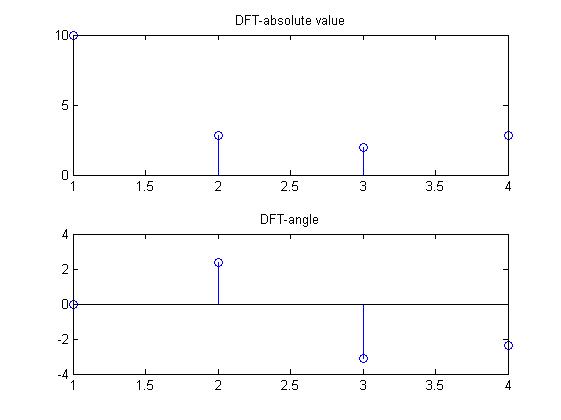
Monday, December 13, 2010
MATLAB PROGRAM TO DISPLAY THE PROPERTIES OF DISCRETE FOURIER TRANSFORM (DFT) - LINEARITY PROPERTY
%DFT linearity property
close all;
clear all;
N=input('Howmany point DFT  do you want?');
x1=input('Enter the first sequence=');
x2=input('Enter the second sequence=');
a=input('Enter the first constant a=');
b=input('Enter the second constant b=');
n1=length(x1);
n2=length(x2);
c=zeros(N);
x1=[x1 zeros(1,N-n1)];%make both x1 and x2
x2=[x2 zeros(1,N-n2)];%of same dimension
x3=a*x1
x4=b*x2
x5=x3+x4 %a*x1+b*x2
for k=1:N
     for n=1:N
         w=exp((-2*pi*i*(k-1)*(n-1))/N);
         %prev.step=>evaluating w-matrix
         x(n)=w;
     end
     c(k,:)=x;  %Every row of w-matrix is inserted &
end             %finally c becomes the w matrix
                %for n-point DFT

 r1=c*x1';   %x1(k)
 r2=c*x2';   %x2(k)
 R3=a*r1+b*r2  %a*x1(k)+b*x2(k)
 R4=c*x5'      %DFT of a*x1(n)+b*x2(n)
 %plotting magnitude and angle
subplot(211)
stem(abs(R4));
title('DFT of {a*x1(n)+b*x2(n)}');
subplot(212)
stem(angle(R3));
title('DFT of {a*x1(k)+b*x2(k)}');
OUTPUT WAVEFORM
MATLAB PROGRAM TO DISPLAY THE PROPERTIES OF DISCRETE FOURIER TRANSFORM (DFT) - MULTIPLICATION PROPERTY
%multiplication property x1(n)*x2(n)=(1/N)*circonv(X1(k)*X2(k))
clear all;
x1=input('enter the sequence=');
x2=input('enter the second seq of same length=');
N9=input ('enter the number of samples=');
x3=(x1).*(x2);  %multiplication of 2 signals
x4=fft(x1,N9);%dft of first seq
N1=length(x4);%length of sequence
x5=fft(x2,N9);%dft of secnd sequence
N2=length(x5);%length of second sequence
%finding circonvolution of 2 signals
x=x4;
h=x5;
N1=length(x);
N2=length(h);
N=max(N1,N2);
x=[x zeros(1,N-N1)];
h=[h zeros(1,N-N2)];
for n=0:N-1
    y(n+1)=0;
    for i=0:N-1
        j=mod(n-i,N);
       y(n+1)=y(n+1)+x(i+1)*h(j+1);
    end
end
y=y/N;   %rhs
x6=fft(x3,N);   %lhs
n=0:1:N-1;
subplot(121);
stem(n,x6);
title('dft of 2 multiplied signals');
grid on;
subplot(122);
stem(n,y);
title('Nth part of circular convolution of 2 dfts');
grid on;
OUTPUT WAVEFORM 
MATLAB PROGRAM TO IMPLEMENT THE PROPERTIES OF DISCRETE FOURIER TRANSFORM (DFT) - FREQUENCY SHIFT PROPERTY
%dft frequecy shift property
close all;
clear all;
N=input('how many point dft do you want?');
x1=input('enter the seq');
n2=length(x1);
c=zeros(N);
x1=[x1 zeros(1,N-n2)];
for k=1:N
    for n=1:N
        w=exp((-2*pi*i*(k-1)*(n-1))/N);
        x(n)=w;
    end
    c(k,:)=x;
end
disp('dft is ');
r=c*x1';
a1=input('enter the amount of shift in frequency domain');
for n=1:N
    w=exp((2*pi*i*(n-1)*(a1))/N);
    x2(n)=w;
end
r1=x2.*x1;
subplot(221);
stem(abs(r));
grid on;
title('orginal dft magnitude plot');
subplot(222);
stem(angle(r));
grid on;
title('orginal dft angle');
for k=1:N
    for n=1:N
        w=exp((-2*pi*i*(k-1)*(n-1))/N);
        x(n)=w;
    end
    c(k,:)=x;
end
disp('dft is');
r2=c*r1';
subplot(223);
stem(abs(r2));
grid on;
title('shifted dft magnitude');
 subplot(224);
 stem(angle(r2));
 grid on;
 title('shifed dft angle');
OUTPUT WAVEFORM

MATLAB PROGRAM TO IMPLEMENT THE PROPERTIES OF DISCRETE FOURIER TRANSFORM (DFT) - CONVOLUTION PROPERTY
clear all;
x= input ('enter the first sequence');
h= input ('enter the second sequence');
No=input('number of samples?');
N1= length(x);
N2= length(h);
N=max(N1,N2);%length of sequence
x=[x zeros(1,N-N1)];  %modified first sequence
h=[h zeros(1,N-N2)];  %modified second sequence

for n=0:N-1;
    y(n+1)=0;
    for i=0:N-1
       j=mod(n-i,N);
       y(n+1)=y(n+1)+x(i+1)*h(j+1);  %shifting and adding
    end
end
n=0:1:No-1;
x4=fft(x);
x5=fft(h);
x6=fft(y);
%seq 2
subplot(121)
stem(n,x6);
title('dft of two convoluted signals');
x7=(x4).*(x5);%product of two dfts
subplot(122);
stem(n,x7);
title('product of two dfts');
grid on;
OUTPUT WAVEFORM

MATLAB PROGRAM FOR DISPLAYING A COMPLEX EXPONENTIAL WAVE
%exponential wave
t=0:0.1:10;
s=0.1+1i;%complex number
y=exp(s*t);%expression for complex exponential
stem3(real(y),imag(y),t,'r');
%to show the 3d graph
%'r'indicates the colour-red
view(-39.5,42);%azimuth and elevation
xlabel('real');
ylabel('imag');
zlabel('amplitude');
title('complex exponential');
rotate3d;%to rotate in 3-dimensions
legend('complex exponential');
OUTPUT WAVEFORM 
MATLAB PROGRAM FOR IMPLEMENTING CIRCULAR CONVOLUTION OF TWO SEQUENCES
function y=circular_convolution(x,h)
x= input ('enter the first sequence');
h= input ('enter the second sequence');
N1= length(x);
N2= length(h);
N=max(N1,N2);%length of sequence
x=[x zeros(1,N-N1)];  %modified first sequence
h=[h zeros(1,N-N2)];  %modified second sequence

for n=0:N-1;
    y(n+1)=0;
    for i=0:N-1
       j=mod(n-i,N);
       y(n+1)=y(n+1)+x(i+1)*h(j+1);  %shifting and adding
    end
end
%to display and plot circular convolution
n=1:N;
disp('output sequence of circular convolution');
disp(y);%to view output in command window
pause;
stem(n,y);%plotting circular convolution
grid minor;
xlabel('time index');
ylabel('amplitude');
title('circular convolution sequence of x and h');
OUTPUT WAVEFORM

MATLAB PROGRAM FOR IMPLEMENTING THE COMPARISON OF LINEAR AND CIRCULAR CONVOLUTION
clear all;
close all;
x= input ('enter the first sequence');
h= input ('enter the second sequence');
N1= length(x);
N2= length(h);
x1=x;
h1=h;
x=[x zeros(1,N2-1)];  %modified first sequence
h=[h zeros(1,N1-1)];  %modified second sequence

for k=1:N1+N2-1;
    s=0;
    for j=1:k
       p(j)=h(j);
    end
    u=eye(k);
    v=flipud(u);
    m=(p)*(v);
    for i=1:k
        s=s+x(i)*m(i);
    end;
    d(k)=s;
end
disp(d);
subplot(211);
stem(d);
xlabel('time index');
ylabel('amplitude');
title('linear convolution');
%circular convolution
N=max(N1,N2);
x1=[x1 zeros(1,N-N1)];
h1=[h1 zeros(1,N-N2)];
z=x1';
for i=1:N-1
    k=x1(N);
    for i=N-1:-1:1;
        x1(i+1)=x1(i);
    end
x1(1)=k;
z=[z x1'];
end
m=z*h1';
disp(m);
subplot(212);
stem(m);
title('circular convolution');
xlabel('time');
ylabel('amplitude');
OUTPUT WAVEFORM

MATLAB PROGRAM FOR IMPLEMENTING CHEBYSHEV HIGH PASS FILTER
%chebyshev HPF
%for specification
clear all;
alphap=input('pass band attenuation?=');
alphas=input('stop band attenuation in db?=');
wp=input('pass band frequency in rad?=');
ws=input('stop band frequency in rad?=');
%to find cuttoff freq and order of filter
[n,wn]=cheb1ord(wp/pi,ws/pi,alphap,alphas);
%system function of filter above expression
[b,a]=cheby1(n,alphap,wn,'high');
w=0:.01:pi;
[h,ph]=freqz(b,a,w);
m=abs(h);
an=angle(h);
subplot(221);
%plot the graph
plot(ph/pi,m);
grid;
ylabel('gain in db');
xlabel('normalisd frequency');
subplot(212);
plot(ph/pi,an);
grid;
ylabel('phase in rad');
xlabel('normalised frequency');
OUTPUT WAVEFORM 
MATLAB PROGRAM FOR IMPLEMENTING CHEBYSHEV LOW PASS FILTER
%chebyshev LPF
% specification
clear all;
alphap=input('pass band attenuation?=');
alphas=input('stop band attenuation in db?=');
wp=input('pass band frq in rad=');
ws=input('stop band freq in rad=');
% find cut-off freq and order of filter
[n,wn]=cheb1ord(wp/pi,ws/pi,alphap,alphas);
%system function above
[b,a]=cheby1(n,alphap,wn);
w=0:.01:pi;
[h,ph]=freqz(b,a,w);m=20*log(abs(h));
an=angle(h);
subplot(221);
plot(ph/pi,m);
grid;
ylabel('gain in db');
xlabel('nor fre');
subplot(212);
plot(ph/pi,an);
grid;
ylabel('phase in rad');
xlabel('norm freq');
OUTPUT WAVEFORM 
Friday, December 10, 2010
MATLAB PROGRAM FOR CROSS-CORRELATION (DIGITAL SIGNAL PROCESSING)
x1=input('Enter first seq=');
x2=input('Enter second seq=');
n1=length(x1);
n2=length(x2);
N=max(n1,n2);
%padding zeros at the end of smaller sequence
if n2>n1
    x1=[x1 zeros(1,N-n1)];
    x3=x2;x2=x1;x1=x3;
elseif (n1>n2)
    x2=[x2 zeros(1,N-n2)];
end
x3=x2;
y=[];
%shifting and multiplying
for n=1:N
    y(n)=0;
    for j=1:N
        y(n)=y(n)+x1(j)*x2(j);
    end
    x=x2(N);
   for i=N-1:-1:1%loop for shifting and adding zeros
       x2(i+1)=x2(i);
   end
   x2(1)=0;
   y(n)=y(n)/N

end
n=1:N; %plotting crosscorrelation output
disp('output seq of cross corr=');
disp(y);
pause;
stem(n,y);
grid on;
grid minor;
xlabel('time index n');
ylabel('amplitude y');
title('cross correlation of sequence x1 and x2');
MATLAB PROGRAM FOR AUTO-CORRELATION (DIGITAL SIGNAL PROCESSIING)
clear all;
x=input('enter the sequence x=');
N=length(x);
y=x;
z=x;
for i=1:N-1
    for i=N-1:-1:1
        x(i+1)=x(i);
    end
    x(1)=0;
    z=[z; x];
end;
m=[z]*[y'];
m=m/N
stem(m);
title('auto-correlation');
xlabel('time index');
ylabel('amplitude');
Subscribe to:
Posts (Atom)